
Sidebar Navigation
Overview
From the CheckSammy customer portal, you can create, track, and manage your service requests from start to finish. The portal is organized into several sections, each designed to give you clear visibility into your requests, quotes, and related activity—all in one place.
Using the Sidebar
This sidebar serves as the primary navigation for the platform, providing quick access to core areas such as requests, quotes, shipments, locations, billing, analytics, and system settings.
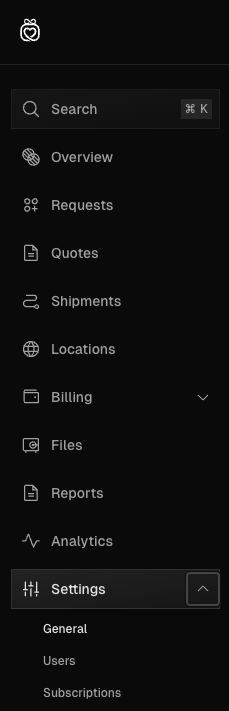
Search Bar
The search bar located at the top of the navigation side panel will enable users to search the entire portal using different search criteria. The search bar can also be accessed using Ctrl + K from anywhere in the platform. You can search the portal including but not limited to the following search criteria:
Service Request & Quote ID
Location Name
Billing Profile Name
Overview
Displays valuable analytics and metrics regarding service requests and ZeroPoint Facility shipments. This includes the status breakdown of all the requests and the sustainability metrics involving ZeroPoint shipments including:
Requests by status and by location.
ZeroPoint shipment materials by location and by weight.
Requests
Create, track, and manage service requests from creation to paying invoices allowing you to stay informed on your requests in real time. Includes a search bar and filters for easily locating requests.
Quotes
Create, track, and manage quote requests. Quotes allow you to track historical pricing in order to make informed decisions on the services you are requesting.
Shipments
If you utilize our ZeroPoint Facility services, you can track and manage shipments here. Shipments allow you to track any load that has been received at our facilities in real time and shows valuable analytics and information.
Locations
Create and manage your service locations. You can add new locations that need service or edit existing locations and create new service requests.
Billing
Create and manage your billing profiles and invoices. Add new billing profiles, update existing profiles, and view and manage invoices.
Files
Review and download any important reports, contracts, certificates or other files we have associated with your account.
Reports
Generate snapshot and recurring material diversion reports and review previous ones.
Analytics
If you utilize our ZeroPoint facilities, you can review very detailed data on every shipment here as generating Excel spreadsheets of the data.
Settings
Manage your company information, departments, requirements, users and subscriptions (coming soon).
Each of these sections will be covered in more detail in dedicated pages that dive deeper into their features, views, and functionality.