
Quote Details
Overview
The Quote Details page provides customers with a detailed view of individual quote requests.
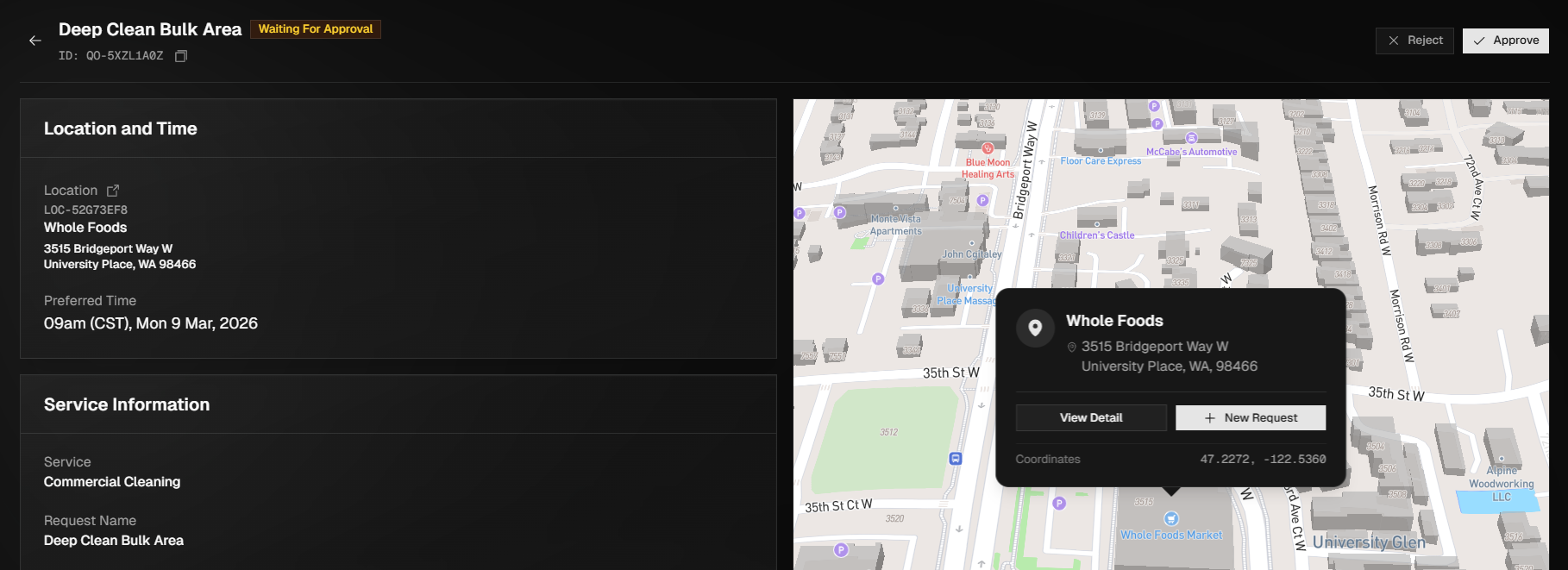
This page is designed to give customers visibility into the quote’s current status, service details, and location information associated with the request while pricing is being prepared or reviewed. The Quote Details page serves as the primary reference point for monitoring the progress of a quote, confirming submitted information, and preparing for approval once pricing is available.
Editing Quotes
To edit a quote, locate the quote using the search or filter options at the top of the screen, then open it by selecting the quote or using the ellipsis menu to the far right and choosing View. From the Quote Details page, select Edit, update any information, and click Update Quote to save your changes.
Approving Quotes
Once pricing has been submitted for review, the quote status will change to Waiting for Approval, indicating that action is required to move forward. From the Quote Details page, review all information carefully to ensure accuracy. If you are satisfied with the pricing and request details, select Approve in the top-right corner of the page to approve the quote. Upon approval, the quote will be automatically converted into a service request, and you will be redirected to the newly created service request.
Rejecting Quotes
Quotes should only be rejected if you have decided not to move forward with the service. If you do not agree with the pricing and would like us to explore alternative pricing options, please contact us so we can attempt to find a better solution. Selecting Reject will close the quote, and any further pricing requests will require submitting a new quote request.